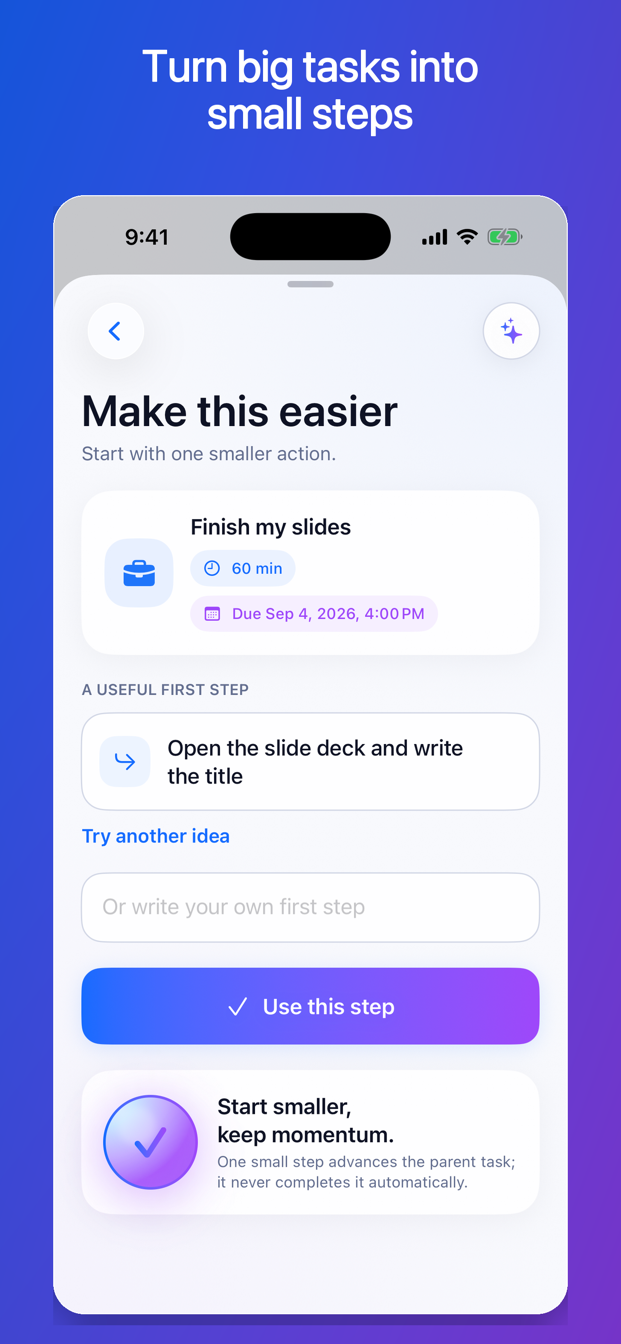
A good first step makes the task easier to enter. It is concrete enough to recognize, small enough to begin, and useful enough to change the state of the project.
Start with the outcome
Write what must be true when the larger task is finished.
- Presentation: the final slides are reviewed, exported, and sent.
- Apartment: the kitchen, bathroom, and floors are cleaned.
- Application: every required field and attachment is submitted before the deadline.
- Research memo: the question is answered with supported analysis in the required format.
The outcome keeps the small step connected to the real work. Without it, breaking a task down can turn into a long checklist of motion that never reaches completion.
Find the current obstacle
Ask why the task cannot begin immediately. Common obstacles include:
- The task is too vague.
- The first decision is unclear.
- A file or tool is missing.
- You need information from someone else.
- The estimated session is too long.
- The work feels risky because the first version may be imperfect.
The smallest useful step should address the current obstacle.
Use the visible-action test
A strong next action usually begins with a verb and produces something you can observe.
Weak: “Think about memo.”
Stronger: “Write the legal question at the top of the document.”
Weak: “Get organized for trip.”
Stronger: “Open the airline site and write down three flight options.”
Weak: “Deal with insurance.”
Stronger: “Find the claim number in the most recent email.”
Weak: “Start cleaning.”
Stronger: “Put the dishes in the dishwasher.”
If you cannot picture yourself doing the step, make it more concrete.
Keep the step small enough to begin
The first step does not need to finish the task. It should cross the starting threshold.
Useful size questions:
- Can I start this without another planning session?
- Can I finish it in the time I actually have?
- Will finishing it make the next step clearer?
- Does it reduce uncertainty, gather a dependency, or create part of the final result?
“Research the issue for three hours” may still be too large. “Search for the controlling statute and save the official text” is a clearer first step.
Avoid steps that are too small to matter
Small does not mean meaningless. “Sit at desk” might help in a difficult moment, but it does not always change the project. Prefer the smallest step that creates information, a decision, a draft, a prepared environment, or a completed piece.
Compare:
| Motion only | Useful small step |
|---|---|
| Open laptop | Open the latest draft and write the missing heading |
| Think about email | Read the thread and draft the first sentence |
| Look at room | Put all dishes into the sink |
| Check application | List the three missing attachments |
The right size depends on the starting difficulty. If “open the laptop” is genuinely the only possible action, use it—then define the next visible step as soon as you can.
Keep the parent task open
Completing “draft the first sentence” is not the same as completing “reply to Sam.” A task system should record the progress without erasing the remaining obligation.
Use a parent-and-step structure:
- Parent: Reply to Sam by noon tomorrow.
- Step: Open Sam’s message and draft the first sentence.
When the step is done, the parent remains open. The next action might be “finish and send the reply.”
Preserve the deadline
Making a task smaller changes the action, not the due date. If the presentation is due Friday, “write three headings” still belongs to a project due Friday.
Keep the deadline visible so the relief of a small step does not hide the remaining risk. If the work is too large for the time left, use the step to reduce harm and make an honest plan.
Examples across ordinary life
Work
Parent: Prepare quarterly report.
First step: Export the current-quarter revenue table and save it in the report folder.
School
Parent: Write the research paper.
First step: Write the question and paste the assignment requirements beneath it.
Home
Parent: Clean the apartment.
First step: Clear the kitchen counters for 10 minutes.
Administrative
Parent: Resolve the medical bill.
First step: Find the statement and circle the account number and disputed charge.
Communication
Parent: Have the difficult conversation.
First step: Write the one outcome you want from the conversation.
Use one step, then reassess
Do not automatically create 40 subtasks for every project. A giant nested checklist can become another form of avoidance. Create one meaningful step, do it, and use what you learned to identify the next one.
More detailed planning is appropriate when steps must occur in a fixed order, involve several people, or carry significant risk. For ordinary work, progressive clarity is often enough.
How FirstNudge makes a task smaller
Select Make Smaller from a task or the Now screen. FirstNudge can suggest one concrete first step with an estimated duration while keeping the parent task and its real deadline visible. Accept it, ask for another suggestion, or write your own.
One new Make Smaller request uses one assisted action. Completing the accepted step does not automatically complete the parent task.
Smaller-step checklist
- State the finished outcome.
- Identify the current obstacle.
- Begin with a visible action verb.
- Fit the step to the time and energy available.
- Make sure the step changes the project in some way.
- Keep the parent task and deadline visible.
- Complete one step, then reassess.
Frequently asked questions
How small should the first step be?
Small enough that you can begin in the current conditions, but large enough to create progress or useful information. Five to 20 minutes is often a practical starting range, not a rule.
Should I break down the entire project at once?
Only when the sequence truly needs advance planning. Otherwise, identify one useful step and let completion reveal the next one.
What if the small step still feels impossible?
Find the hidden obstacle. You may need an even earlier action: locate the file, ask one question, obtain permission, or define the finish line.
Make the starting line visible.
You do not need to feel ready for the whole project. Find one action that changes the project and begin there.
Make a task smaller with FirstNudge