You do not need a perfect ranking of the entire list. You need a reasonable choice for the next block of time.
Start with a safety check
Before filtering for convenience, identify work that could cause a serious problem if ignored. Look for:
- Overdue tasks.
- Confirmed deadlines approaching soon.
- Time-sensitive messages or decisions.
- Tasks that block another person.
- Obligations with legal, financial, academic, health, or safety consequences.
This does not mean you must finish the largest urgent task immediately. It means the task should remain visible while you choose a feasible next action.
Then use five filters
1. Deadline
Which task has the earliest real due date? Use confirmed deadlines, not dates you added merely because the list felt crowded.
2. Consequence
What happens if the task waits? A short reply that unblocks a coworker may matter more than a longer independent project with the same deadline.
3. Availability
Can you act now? A task may require a laptop, a quiet room, an open business, another person, or information you do not have. Mark a real blocker instead of repeatedly choosing an impossible task.
4. Time
How much uninterrupted time do you actually have? Choose an action that can make honest progress within that window. Do not make a 45-minute urgent task disappear because you have only 10 minutes; identify a 10-minute starting step.
5. Energy
How much concentration or effort is available? Low energy can still support a useful action, but it may change which action is realistic. Use energy as a fit signal, not as an excuse to hide urgent work.
A simple decision order
Use this order when the list feels flat:
- Protect overdue and near-deadline work.
- Prefer work with meaningful consequences or other people waiting.
- Remove tasks that cannot be acted on now.
- Match the next action to the time and energy available.
- Among similar options, choose the one that has waited longer or reduces future uncertainty.
If two tasks remain tied, choose either one. The cost of another 15 minutes of ranking may be greater than the difference between the choices.
Example: five tasks, ten minutes
Assume your list says:
- Reply to Sam by noon tomorrow — 10 minutes.
- Finish presentation Friday — 90 minutes.
- Return shoes Sunday — 20 minutes.
- Book dentist appointment — 10 minutes, no deadline.
- Organize downloads folder — 20 minutes, no deadline.
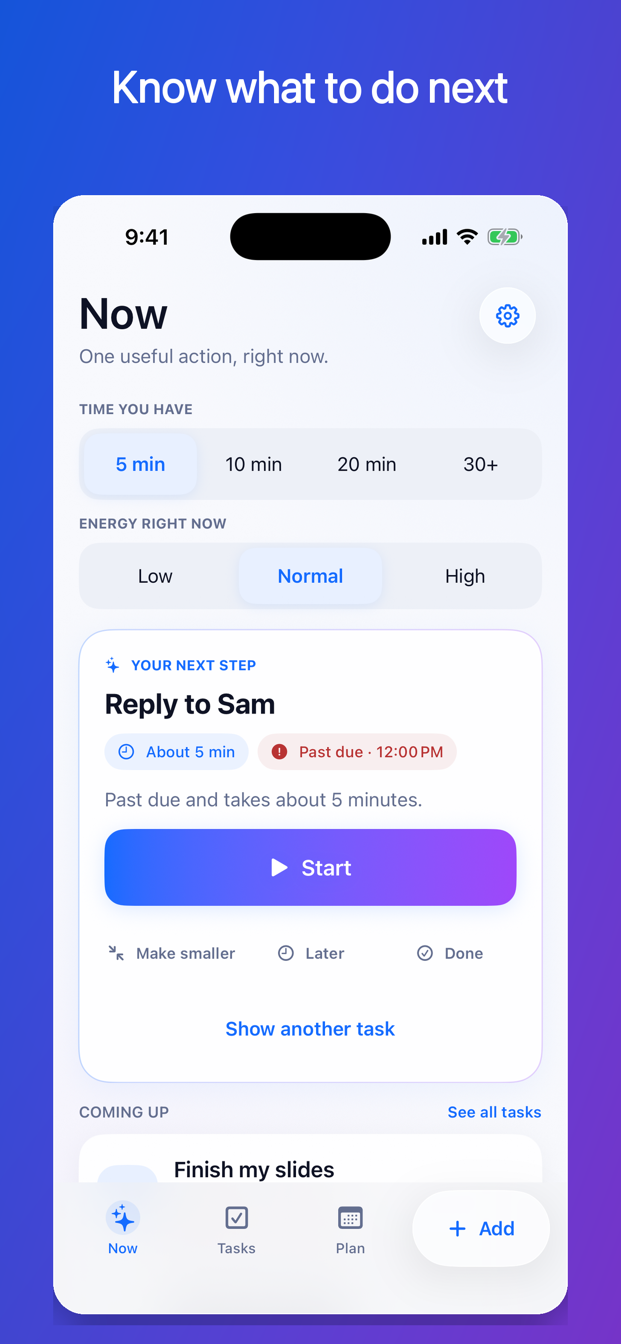
You have ten minutes and normal energy. Replying to Sam is a sensible next action because the deadline is close and the work fits. If the presentation were due in two hours, it should remain the urgent item even though the whole project does not fit. The next action might become “Open the deck and write the three section headings.”
Do not confuse importance with size
Large tasks often look important because they occupy more visual space. Small tasks can carry larger consequences. At the same time, completing five tiny errands is not automatically better than beginning one meaningful project.
Compare consequences and deadlines first. Use task size to find a feasible action, not to decide what matters.
Do not let low effort become permanent avoidance
Quick wins can help create motion, but a system that always selects the easiest task can bury difficult obligations. Keep a separate attention area for overdue, near-deadline, or repeatedly postponed work. If the difficult task cannot be completed now, choose a useful step that reduces its risk.
Keep the recommendation explainable
A useful recommendation should have a reason you can check:
- Due tomorrow.
- Fits 10 minutes.
- You marked this important.
- Another person is waiting.
- This has been postponed three times.
“The algorithm chose it” is not a reason. If the reason does not make sense, choose another task and correct the underlying deadline, estimate, or status.
How FirstNudge chooses a next action
FirstNudge’s Now screen uses saved task information on your device. Choose 5, 10, 20, or 30+ minutes and select low, normal, or high energy. The app offers one eligible action with a short reason and keeps urgent risks visible. You can choose another task, postpone an attempt, mark work done, or ask for a smaller first step.
The ordinary Now recommendation does not use an assisted action and does not send your whole task list to an AI model.
What-to-do-next checklist
- Identify real deadlines and serious consequences.
- Mark tasks that are blocked or unavailable.
- State the time you actually have.
- Use current energy as a fit signal.
- Keep urgent long work visible.
- Create a smaller first step when the whole task will not fit.
- Choose one action and begin before ranking the list again.
Frequently asked questions
Should I always do the most urgent task first?
Protect it first. If it can be acted on now, begin it or a smaller step. If it is truly blocked, record the blocker and choose the best available action while keeping the risk visible.
What if I choose the wrong task?
Most everyday choices are not permanent. Use a short focus session, reassess when it ends, and correct inaccurate task details. A reasonable action now is often more useful than a perfect decision later.
Should I clear quick tasks before deep work?
Only when the quick tasks have real consequences or when a short clearing period is intentional. Do not let an endless supply of easy tasks consume the time reserved for important work.
Do not solve the whole list. Choose the next useful move.
Find one next action with FirstNudge