The goal is not to organize every thought perfectly. The goal is to leave with a small number of clear tasks you can recognize and start.
What is a brain dump?
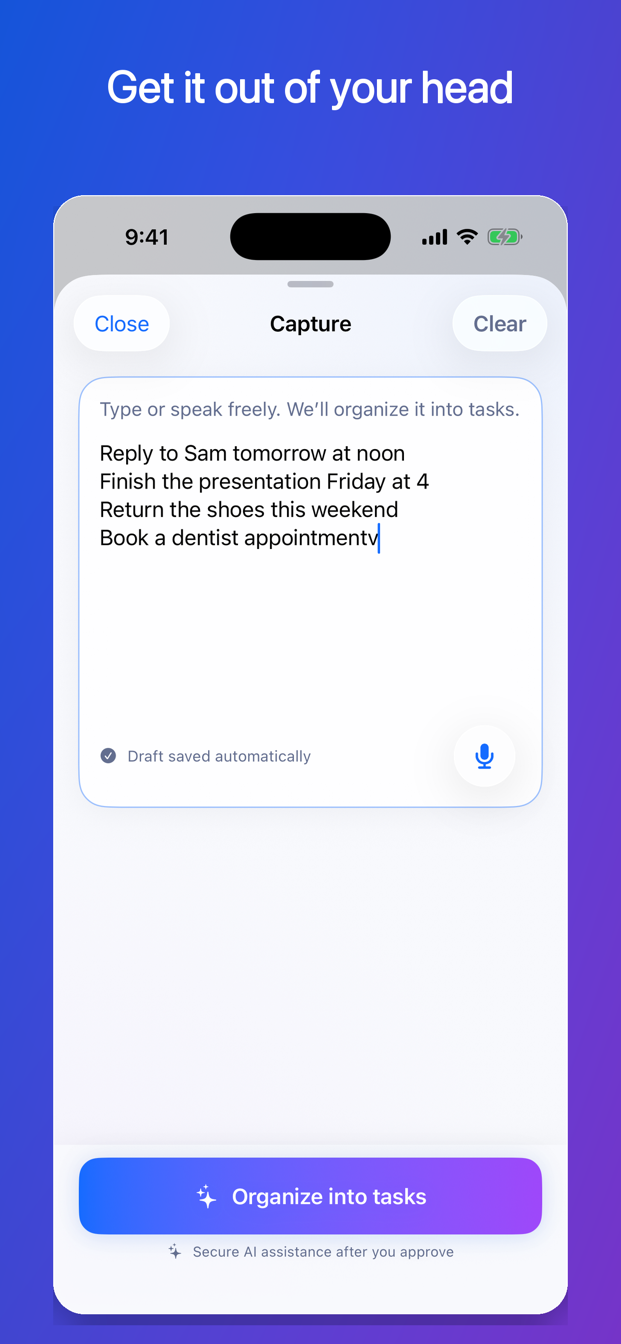
A brain dump is an unfiltered list or paragraph containing whatever you are trying to remember. It might look like this:
Reply to Sam tomorrow at noon, finish the slides Friday at four, return the shoes Sunday, dentist, figure out summer travel, maybe replace the desk chair, ask Maya about the notes.
That sentence contains different kinds of information:
- A task with a timed deadline: reply to Sam by noon tomorrow.
- A project with an ambiguous time: finish the slides Friday at four—but is that 4:00 a.m. or 4:00 p.m.?
- A task with a date-only deadline: return the shoes by Sunday.
- An undated task: book a dentist appointment.
- A project that needs another decision: plan summer travel.
- An idea, not necessarily a commitment: maybe replace the desk chair.
- A task with another person involved: ask Maya about the notes.
The brain dump did its job: it captured the mental clutter. Now give each item only enough structure to become useful.
Pass 1: Separate commitments from ideas
Ask one question about each item: Am I actually committed to doing something about this?
If yes, make it a task or project. If no, delete it or move it to a separate ideas list. “Maybe replace the desk chair” should not sit beside a real deadline unless you have decided to act on it.
This pass keeps optional thoughts from making the task list look more urgent and crowded than it is.
Pass 2: Separate projects from next actions
A project describes an outcome that requires more than one action. A next action describes something visible you can do in one sitting.
Compare:
| Project or vague item | Clear next action |
|---|---|
| Finish the slides | Open the deck and write the three section headings |
| Plan summer travel | Text Maya to confirm the possible dates |
| Deal with insurance | Find the policy number in the last email |
| Clean the apartment | Put the dishes in the dishwasher |
You do not need to map the entire project. Identify the parent task and one useful starting action. More steps can become clear after you begin.
Pass 3: Clarify dates without inventing them
Dates in a brain dump can mean different things. Record only what you know.
- “By noon tomorrow” is a timed deadline.
- “By Sunday” is a date-only deadline unless a time was stated.
- “Work on it Thursday” is a planned work time, not necessarily the due date.
- “Remind me Thursday” is a reminder request, not automatically a deadline.
If “Friday at four” could mean morning or afternoon, resolve the ambiguity before saving it as a confirmed deadline. A blank date is more accurate than a confident wrong date.
Pass 4: Estimate only enough to choose
Time estimates are useful when they help you match a task to a real opening. They become harmful when a rough guess is treated like a promise.
Use broad, practical estimates: 5 minutes, 10 minutes, 20 minutes, or 30+ minutes. If a project is too large to estimate, estimate the next action instead. “Finish the slides” may be 90 minutes; “write three headings” may be 10.
Pass 5: Choose one action before reorganizing again
Once the list is usable, stop cleaning it. Choose one action using:
- A real deadline or serious consequence.
- Whether the action can begin now.
- The time you actually have.
- The energy or concentration available.
- Whether a small step would reduce risk on a larger urgent task.
If you have ten minutes and Sam needs a reply tomorrow, drafting the first sentence may be more useful than perfectly categorizing the remaining list.
A complete before-and-after example
Reply Sam, slides, shoes, dentist, trip, ask Maya.
- Reply to Sam — due tomorrow at noon — estimate 10 minutes.
- Finish presentation — due Friday at 4:00 p.m. after confirming the time — estimate 90 minutes.
- Next step: open the deck and write three section headings — estimate 10 minutes.
- Return shoes — due Sunday, date only — estimate 20 minutes.
- Book dentist appointment — no deadline — estimate 10 minutes.
- Text Maya to confirm summer-travel dates — no deadline — estimate 5 minutes.
- Ask Maya for the class notes — waiting afterward if she has not replied.
The second version is not beautiful. It is usable. That is the point.
How FirstNudge handles a brain dump
In FirstNudge, you can type or speak the raw thought, then use assisted Capture organization to prepare editable drafts. Review titles, dates, and estimated time before saving. You can remove a draft, fix an ambiguous date, split or combine items, or save a task manually instead.
One multi-task Capture organization counts as one assisted action. Manual task entry does not use an assisted action.
Brain-dump checklist
- Capture first without editing every sentence.
- Remove ideas that are not commitments.
- Keep projects, but add one visible next action.
- Distinguish deadlines, work times, and reminders.
- Resolve ambiguous dates instead of guessing.
- Use rough estimates to choose, not to judge yourself.
- Start one action before reorganizing the list again.
Frequently asked questions
Should a brain dump include personal and work tasks together?
It can. Capture whatever is competing for attention, then label or filter items later if that helps. Separate lists are useful only when they make choosing easier.
How often should I do a brain dump?
Do one when several thoughts are competing for attention or when you are afraid you will forget something. It does not need to become a mandatory daily ritual.
What if I cannot identify the next action?
Use a discovery step: “Open the document,” “find the last email,” “write the question I need answered,” or “list the missing information.” A step can be useful even when it does not finish the project.
Capture the mess. Confirm the details. Start one thing.
FirstNudge helps you move from a brain dump to editable tasks and one next action that fits the time and energy you have.
Try brain-dump capture in FirstNudge